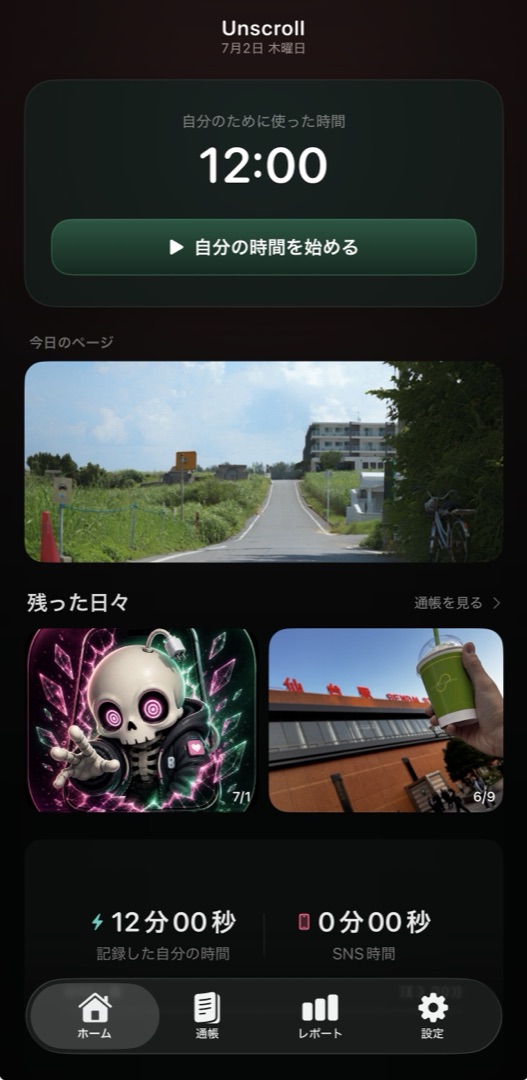
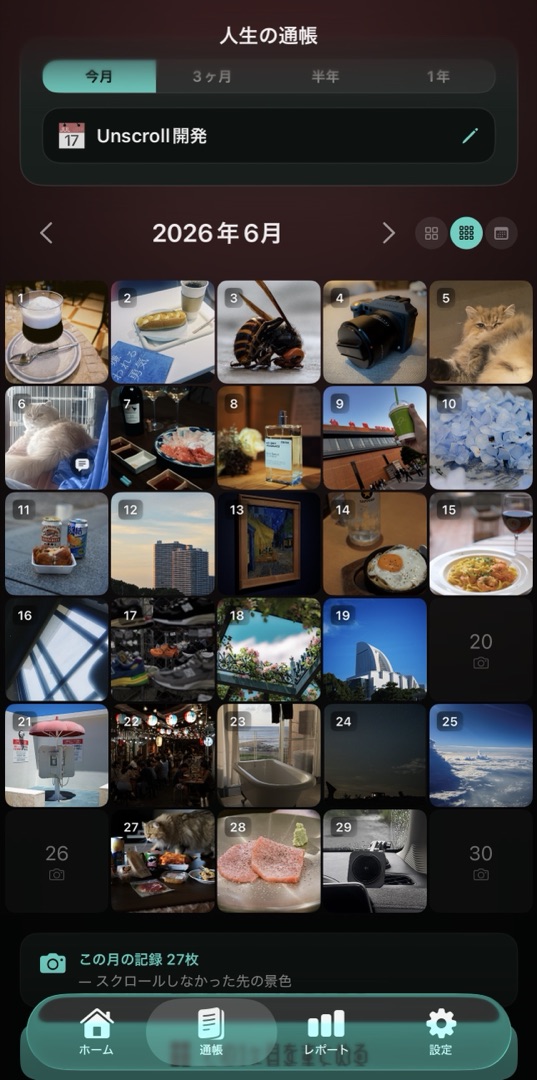
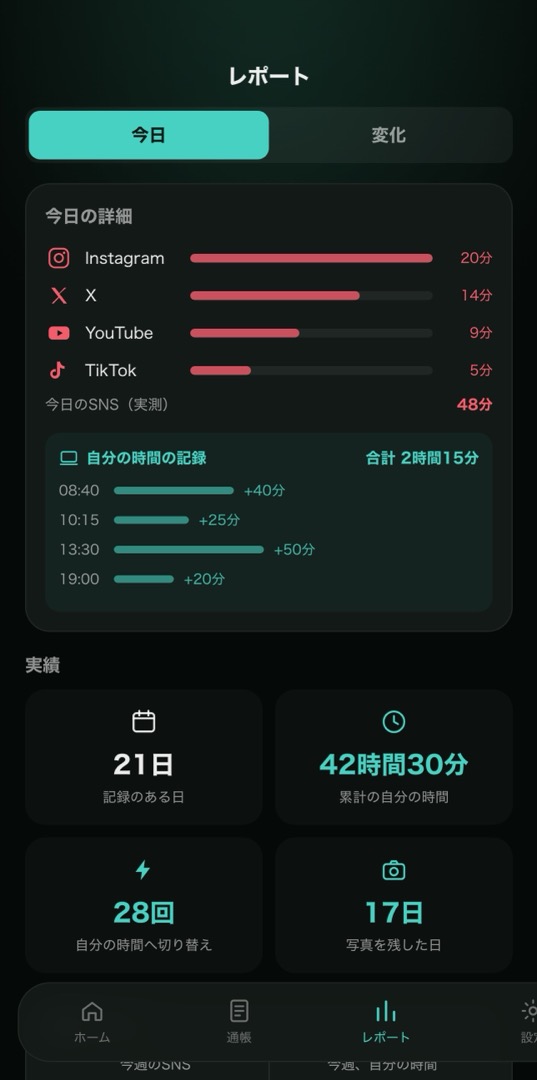
The time you spend on yourself, kept in numbers and photos.
You don't have to quit social media — just turn the aimless scrolling into time of your own.
Not the “good” that scrolls past you, but the day you thought was good.
iPhone · iOS 17 or later · free to start
Every minute you start adds up to today.
Today, this week, this month — not whether it dropped, but how it changed.
The one photo you wanted to keep, and a few words, saved to that day.
The day is over before you notice. You can't recall what you did last week.
It isn't only the time your thumb was moving. The hours you drifted along with the feed disappear the same way.
What you lose may be less the time itself than the days you could have remembered.
Social media lives inside a daily budget. Not banned, not endured — redirected.
And a photo from the time you actually gave your attention to builds up as a record.

It doesn't have to look good, and you don't have to shoot it well. You keep it because you thought it was good.
Those photos build up like entries in a journal.
Not to show anyone. So that you can remember, later.
Invite the people who were there into a day on your calendar.
Each of you brings your own nine photos, so one day is kept from as many points of view as there are people.
They see the photos you brought and the words you added — nothing else.
Your note for the day, your favourites and the time you recorded stay yours.
No notifications. No badges. No “new.”
It’s simply there the next time you open it.
At that moment, Yutora offers you your own time instead. Start even one minute, and you're back in time you chose.
Social media lives inside a daily budget. While you're recording, it's quietly blocked. You set the limit.
The photo you wanted to keep goes into that day's journal. Your week, your month, your year take shape.
The daily record and the photo from that day. Numbers and memories sit in the same journal, so the time you spent on yourself becomes something you can feel. Look back by day, week, month or year, and you start to see how you've changed.


Not how many hours of social media they cut.
The day feels longerthan it used to.
The way I use my time changed, and I have enough room — in my schedule and in my head — to actually remember what happened each day. The bigger thing isn't that my social media time went down; it's that the life after it changed.
— A long-term userIt makes you want totreasure your own time.
What I like most is being able to measure my own time. I noticed where my time was going, and it made me want to make better use of the day. Because it only trims the aimless scrolling, it never feels restrictive — which makes it easy to recommend.
— A long-term userSeeing “this much was for me today”is what I like.
I tried a Pomodoro timer before and it never stuck. This one does, because I can see the time I spent on myself adding up. It keeps the time and the photos together, so I think it suits people who like taking pictures too.
— A long-term userPublished with permission. Condensed and edited for readability, and translated from Japanese. Individual experiences vary.
Results differ from person to person. Try it in your own days first.
iPhone · iOS 17 or later · free to start
Enter your daily social media time.
See what it adds up to over a week, a month, a year.
This app is for deciding, yourself, where that time goes.
I wanted to work, and kept finding myself scrolling instead. I hated that I couldn't focus. So I built something for myself: a way to start my own time before opening social media.
What I realised later was that it wasn't only work time I'd been losing. The year I spent with less aimless scrolling was astonishingly full. The years before it, I think I was just drifting. Between the time I kept watching without purpose and now, when I choose where my time goes, the number of days I actually remember is completely different.
I added the photo feature because I wanted to keep those remembered days. I won't tell you that you have to quit. If you don't want to, that's fine. But if you'd rather give your time to what you think is good, instead of what happens to scroll past — I'd like to help with that.
Turn only the aimless scrolling into time you chose.
What you do with that time stays, as photos and records.
Free to start. Photos, your own time, and keeping a day together.
iPhone · iOS 17 or later · Available in English and Japanese.
Cancel any time — your records are never deleted.
Questions, requests and behind-the-scenes development live in the community. Free to join, leave any time.
It doesn't end at locking apps. Social media lives inside a daily budget, the time you spend on yourself is measured, and the day itself is kept in a photo. What remains isn't a record of what you quit — it's a record of what you lived.
No. You decide how much time you get each day. Only when you go past it are you gently pointed back to your own time. It isn't here to stop you posting, messaging or working. And it doesn't care whether you're on a screen or off it — the night you watched a film to the end, the day you finished a book: if you chose to give it your attention, that is your time.
On your device and in your own iCloud, and nowhere else. Nothing is sent to the developer's servers. Exporting and sharing are always your choice.
Photos only — there is no video recording. What stays is a single still image. A photo takes one press of the shutter; a video means holding your phone up for as long as it runs. What this app wants to add to your day isn't time spent holding a screen — it's time spent looking at something with your own eyes. And once pictures start moving inside a grid, that grid is a feed.
Photos, notes, recording your own time, monthly collages and keeping a day together all work without a subscription. Blocking starts with the one app you spend the most time in. Premium adds protection across several apps at once and looking back over any period. The yearly plan includes 14 days free. If you cancel, the records and photos you already have are not deleted.